

Description
Many users of typical cantilever arm TV brackets might notice that the mounted TV may sag slightly once
pulled away from wall. The Allcam PLB127-series TV wall bracket has a set of specially-designed scissor-action arms designed to keep the TV perfectly level even when the TV is pulled fully away from
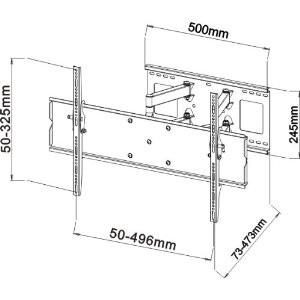
the wall, at a distance of up to 473 mm (18.6″). Similar to the PLB109- and PLB126-series TV wall mount, the swivel scissor arm can be pulled-out from the wall and swivelled left and right by 90°, for example if you want to mount your TV in a corner or an alcove.
The Allcam PLB127-series of TV wall Mount Bracket have three sizes which should be selected based on your TV. (see FAQ section for further information on how to select the appropriate bracket).
- Small PLB127S, maximum mounting hole spacing < 496×325 mm, VESA from 75×75 up to 400×200, overall size 510x350x120 mm, roughly for 26″-37″ TV/Monitors
- Medium PLB127M, maximum mounting hole spacing < 768x455mm, VESA from 200×200 up to 600×400, overall size 765x530x120 mm, roughly for 32″-55″ TV/Monitors
- Large PLB127L, maximum mounting hole spacing < 870×480 mm, VESA from 200×200 up to 800×400, overall size 918x530x120 mm, roughly for 40″-65″ TV/Monitors
Key Features of PLB127-series LCD TV Wall Bracket
-
- Specially designed scissor-action arms to keep the TV perfectly level when pulled-away from wall
- TV wall mount bracket made from heavy duty steel sheet, supporting a maximum load capacity of 60 kg (120 lb)
- Universal, with options to suit all wall-mountable LCD/LED TVs
- Pull-out from wall up to 473 mm / 18.6″
- Highly flexible: swivel left/ right up to 90°, tilt downward up to 12°
- When fully closed, the mounted TV is only 73 mm / 2.9″ from wall
- With integrated bubble level to aid installation
- Durable powder-coated black finish.
- Easy to install, step-by-step installation manual included
- Including wall-mounting hardware & bolts (M4, M5, M6, M8) for TV
FAQs
Q: How do I choose the right size wall mount bracket for my LCD/Plasma TV?
- Firstly, check the back of your TV and find the four threaded holes (if there is no threaded holes or less than four holes, then the TV is not classified as wall-mountable);
- Secondly, measure the horizontal and vertical spacing between them (in mm); for example, horizontal = 400 mm; vertical = 200 mm
- Now select a bracket whose supported maximum mounting-hole spacing is larger than one you have just measured
- Please also check the overall size of the TV is smaller than the TV size otherwise the bracket will be stick out from the back of the TV.
- You might also want to check whether the TV connections/ports is facing backward or not. If they are facing backwards it may be difficult to get the cables round the back of the TV if you choose a super slim bracket such as the PLB105
Make sure to check this compatibility information! The TV sizes mentioned in the item title are for general reference only.
Warranty Info
These PLB127-series TV wall mount bracket are brand new, in retail packaging, with a full, 5-year warranty.


Reviews
There are no reviews yet.